Showing posts with label t-sql. Show all posts

Monday, December 7, 2015

Inner Vs. Outer Join

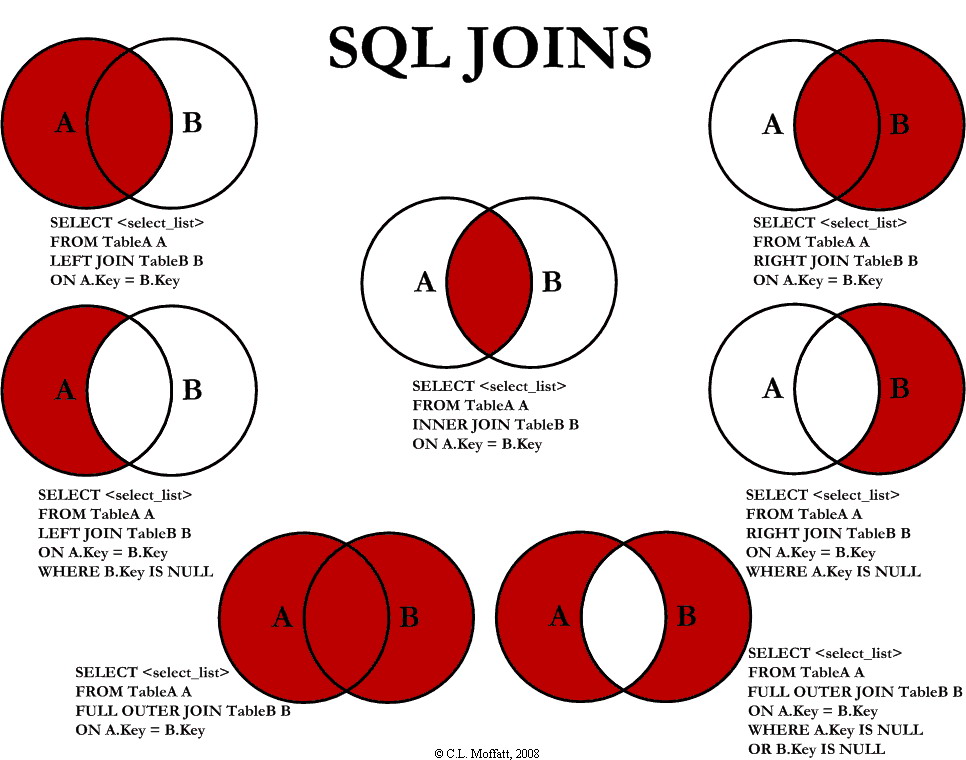
What is the difference between and inner and out join in SQL?  I hear this question a lot (at work, when I conduct interviews, and when I'm interviewed).  The answer isn't as straight forward as you may think.  Here is a diagram from the article  "Visual Representation of SQL Joins" by C.L. Moffat that show's a visual representation of what each time of join does:


There are other good discussion on the difference between inner and outer joins found in Stack Overflow.

Tuesday, March 18, 2014

Search for Column in All Tables

SELECT t.name AS table_name,
SCHEMA_NAME(schema_id) AS schema_name,
c.name AS column_name,c.max_length
FROM sys.tables AS t
INNER JOIN sys.columns c ON t.OBJECT_ID = c.OBJECT_ID
WHERE c.name LIKE '%SomeColumnName%'
ORDER BY schema_name, table_name;


Links
Dave Pinal

Wednesday, March 12, 2014

Searching Wildcard Character In a Varchar

declare @ExpressionToSearch varchar(100),@ExpressionToFind varchar(1)


set @ExpressionToSearch ='%blah hello%'
set @ExpressionToFind ='[%]'

print len(@ExpressionToSearch)
print substring(@ExpressionToSearch,1,1)
print substring(@ExpressionToSearch,2,len(@ExpressionToSearch))


print substring(@ExpressionToSearch,len(@ExpressionToSearch),1)
print substring(@ExpressionToSearch,1,len(@ExpressionToSearch)-1)


IF @ExpressionToSearch LIKE '%' + @ExpressionToFind + '%'
    PRINT 'Yes it Contains'
       if substring(@ExpressionToSearch,1,1)='%'
              print 'first'
       if substring(@ExpressionToSearch,len(@ExpressionToSearch),1)='%'
              print 'last'
ELSE
    PRINT 'It doesn''t Contain'

Links
stackoverflow
sqlhints

Friday, February 21, 2014

Cannot Resolve the Collation Conflict in WHERE Clause

Cannot resolve the collation conflict between "SQL_Latin1_General_CP1_CI_AS" and "Latin1_General_CI_AS" in the equal to operation.


 select * from sometable1
 
 where user_id COLLATE DATABASE_DEFAULT in (
       select userid COLLATE DATABASE_DEFAULT from (
              SELECT distinct convert(nvarchar(100),[User]) [user],[UserId]
              FROM sometable2
         ) a
  )
 

Thursday, February 20, 2014

Counting Number of Columns in a Table


select count(*)
from Information_Schema.Columns c
where table_name = 'mytable'


stackoverflow

Tuesday, February 18, 2014

Search All Table for Text

I thought I had posted something like this before, but then found  new option for Searching All Table for Text Value - Sorna Kumar Muthuraj


EXEC SP_SearchTables @Tablenames = '%'
,@SearchStr = '%some text to search%'

-------------
IF OBJECT_ID('SP_SearchTables','P') IS NOT NULL
    DROP PROCEDURE SP_SearchTables
GO

CREATE PROCEDURE SP_SearchTables
 @Tablenames VARCHAR(500)
,@SearchStr NVARCHAR(60)
,@GenerateSQLOnly Bit = 0
AS
 
/*
Written by Sorna Kumar Muthuraj

    Parameters and usage
 
    @Tablenames        -- Provide a single table name or multiple table name with comma seperated. 
                        If left blank , it will check for all the tables in the database
    @SearchStr        -- Provide the search string. Use the '%' to coin the search. 
                        EX : X%--- will give data staring with X
                             %X--- will give data ending with X
                             %X%--- will give data containig  X
    @GenerateSQLOnly -- Provide 1 if you only want to generate the SQL statements without seraching the database. 
                        By default it is 0 and it will search.
 
    Samples :
 
    1. To search data in a table
 
        EXEC SP_SearchTables @Tablenames = 'T1'
                         ,@SearchStr  = '%TEST%'
 
        The above sample searches in table T1 with string containing TEST.
 
    2. To search in a multiple table
 
        EXEC SP_SearchTables @Tablenames = 'T2'
                         ,@SearchStr  = '%TEST%'
 
        The above sample searches in tables T1 & T2 with string containing TEST.
    
    3. To search in a all table
 
        EXEC SP_SearchTables @Tablenames = '%'
                         ,@SearchStr  = '%TEST%'
 
        The above sample searches in all table with string containing TEST.
 
    4. Generate the SQL for the Select statements
 
        EXEC SP_SearchTables @Tablenames        = 'T1'
                         ,@SearchStr        = '%TEST%'
                         ,@GenerateSQLOnly    = 1
 
*/
 
    SET NOCOUNT ON
 
    DECLARE @MatchFound BIT
 
    SELECT @MatchFound = 0
 
    DECLARE @CheckTableNames Table
    (
    Tablename sysname
    )
 
    DECLARE @SQLTbl TABLE
    (
     Tablename        SYSNAME
    ,WHEREClause    VARCHAR(MAX)
    ,SQLStatement   VARCHAR(MAX)
    ,Execstatus        BIT 

    )
 
    DECLARE @SQL VARCHAR(MAX)
    DECLARE @tmpTblname sysname
    DECLARE @ErrMsg VARCHAR(100)
 
    IF LTRIM(RTRIM(@Tablenames)) IN ('' ,'%')
    BEGIN
 
        INSERT INTO @CheckTableNames
        SELECT Name
          FROM sys.tables
    END
    ELSE
    BEGIN
 
        SELECT @SQL = 'SELECT ''' + REPLACE(@Tablenames,',',''' UNION SELECT ''') + ''''
 
        INSERT INTO @CheckTableNames
        EXEC(@SQL)
 
    END
 
    IF NOT EXISTS(SELECT 1 FROM @CheckTableNames)
    BEGIN
        
        SELECT @ErrMsg = 'No tables are found in this database ' + DB_NAME() + ' for the specified filter'
        PRINT @ErrMsg
        RETURN
 
    END
    
    INSERT INTO @SQLTbl
    ( Tablename,WHEREClause)
    SELECT QUOTENAME(SCh.name) + '.' + QUOTENAME(ST.NAME),
            (
                SELECT '[' + SC.Name + ']' + ' LIKE ''' + @SearchStr + ''' OR ' + CHAR(10)
                  FROM SYS.columns SC
                  JOIN SYS.types STy
                    ON STy.system_type_id = SC.system_type_id
                   AND STy.user_type_id =SC.user_type_id
                 WHERE STY.name in ('varchar','char','nvarchar','nchar','text')
                   AND SC.object_id = ST.object_id
                 ORDER BY SC.name
                FOR XML PATH('')
            )
      FROM  SYS.tables ST
      JOIN @CheckTableNames chktbls
                ON chktbls.Tablename = ST.name 
      JOIN SYS.schemas SCh
        ON ST.schema_id = SCh.schema_id
     WHERE ST.name <> 'SearchTMP'
      GROUP BY ST.object_id, QUOTENAME(SCh.name) + '.' +  QUOTENAME(ST.NAME) ;
    
 
      UPDATE @SQLTbl
         SET SQLStatement = 'SELECT * INTO SearchTMP FROM ' + Tablename + ' WHERE ' + substring(WHEREClause,1,len(WHEREClause)-5)
 
      DELETE FROM @SQLTbl
       WHERE WHEREClause IS NULL
    
    WHILE EXISTS (SELECT 1 FROM @SQLTbl WHERE ISNULL(Execstatus ,0) = 0)
    BEGIN
 
        SELECT TOP 1 @tmpTblname = Tablename , @SQL = SQLStatement
          FROM @SQLTbl 
         WHERE ISNULL(Execstatus ,0) = 0
 
         IF @GenerateSQLOnly = 0
         BEGIN
 
            IF OBJECT_ID('SearchTMP','U') IS NOT NULL
                DROP TABLE SearchTMP
                
            EXEC (@SQL)
 
            IF EXISTS(SELECT 1 FROM SearchTMP)
            BEGIN
                SELECT Tablename=@tmpTblname,* FROM SearchTMP
                SELECT @MatchFound = 1
            END
 
         END
         ELSE
         BEGIN
             PRINT REPLICATE('-',100)
             PRINT @tmpTblname
             PRINT REPLICATE('-',100)
             PRINT replace(@SQL,'INTO SearchTMP','')
         END
 
         UPDATE @SQLTbl
            SET Execstatus = 1
          WHERE Tablename = @tmpTblname
 
    END

    IF @MatchFound = 0 
    BEGIN
        SELECT @ErrMsg = 'No Matches are found in this database ' + DB_NAME() + ' for the specified filter'
        PRINT @ErrMsg
        RETURN
    END
    
    SET NOCOUNT OFF
 
go


Wednesday, February 5, 2014

Search All Stored Procedures

SELECT DISTINCT o.name AS Object_Name,o.type_desc
FROM sys.sql_modules m
INNER JOIN sys.objects o
ON m.object_id=o.object_id
WHERE m.definition Like '%InsertIds%'

--or


SELECT Name
FROM sys.procedures
WHERE OBJECT_DEFINITION(OBJECT_ID) LIKE '%InsertIds%'
GO


Friday, January 31, 2014

Create New Table with Prefixes and Simple Id Options

-- =============================================
-- Author:           John Roth
-- Create date: 2010
-- Modified: August 14, 2013
-- Modified: July 10, 2013
-- Description:        Order in which to create tables to get the most out of this store procedure is:
--                                create a tbUser table with simple id
--                                create an lkp table ending with the name Type and with NO "Usertable specified" (e.g. lkpStoreType)
--                                create a tb table (e.g. tbStore, tbOwner, tbProduct) WITH "Usertable specified"
--                                create an idx table (e.g. idxStore_Product) WITH "Usertable specified"
-- Example:
--                   USE [Redbull]
--                   GO

--                   DECLARE       @return_value int

--                   EXEC   @return_value = [development].[CreateNewTable_Prefix_withSimpleIdOption]
--                                @TablePrefix = N'idx',
--                                @NewTableName = N'Store_Product',
--                                @SimpleId = 1,
--                                @FullUserTableNameWithSchema = N'dbo.tbUser'

--SELECT      'Return Value' = @return_value

--GO

-- To Do:  1. detect prefix (LKP, IDX, TB) and add constraints automatically.
--                         LKP: (create a unique index on the value column)
--                         IDX: (don't create a value column, instead create a <table1>Id and <table2>Id bigint columns based on the names of the idx table
--                                (e.g. idx<table1>_<table2> and could create relations if the tables already exist. 
--                         TB:    (create a type (bigint) column, and a unique constraint on value).             
--                        
--                         NOTE: I suppose that "code first" development would take care of all of this :), but there are still some "code first" nuances (enums) that still are quite right in my book.      
--
--
--                   2.  if a user tables exists or is specified you could auto create a relationship with the createby or modifiedby columns
-- =============================================
ALTER PROCEDURE [development].[CreateNewTable_Prefix_withSimpleIdOption]
       -- Add the parameters for the stored procedure here
       @TableSchema nvarchar(100) = null,@TablePrefix nvarchar(100) = '',@NewTableName nvarchar(150),@SimpleId bit = 0,@FullUserTableNameWithSchema nvarchar(500)=null
AS
BEGIN
       -- SET NOCOUNT ON added to prevent extra result sets from
       -- interfering with SELECT statements.
       SET NOCOUNT ON;

    -- Insert statements for procedure here

set @TablePrefix = lower(@TablePrefix)

declare @command nvarchar(max),@IdName nvarchar(200),@TableName nvarchar(500),@table1 nvarchar(150),@table2 nvarchar(150),@delim char(1),@index int
set @delim = '_'

if @SimpleId = 1
       begin
              set @IdName = 'Id'
       end
else
       begin
              set @IdName = @NewTableName +'Id'
       end
if @TablePrefix='idx'
begin
       set @index = charindex(@delim,@NewTableName)

       if @index > 0
       begin
        set @table1 = substring(@NewTableName,0,@index)
        set @table2 = substring(@NewTableName,@index+1,1000)

        --propper case it
        set @table1 =upper(substring(@table1,1,1))+lower(substring(@table1,2,1000))
        set @table2 =upper(substring(@table2,1,1))+lower(substring(@table2,2,1000))

       end
end

set @TableName = '['+isnull(@TableSchema,'dbo')+'].['+@TablePrefix+@NewTableName+']'


set @command='
CREATE TABLE '+@TableName+'(
       ['+@IdName+'] [bigint] IDENTITY(1,1) NOT FOR REPLICATION NOT NULL,  
       [Created] [datetime] NOT NULL,
       [Modified] [datetime] NOT NULL,
       [CreatedBy] [bigint] NOT NULL,
       [ModifiedBy] [bigint] NOT NULL,'
       +iif(@TablePrefix='idx','['+@table1+'Id] [bigint] NOT NULL,   ['+@table2+'Id] [bigint] NOT NULL,','[Value] [nvarchar](150) NULL,')
       +iif(@TablePrefix='tb','[Type] [bigint] NULL,','')+'
 CONSTRAINT [PK_'+@TablePrefix+@NewTableName+'] PRIMARY KEY CLUSTERED
(
       ['+@IdName+'] ASC
)WITH (PAD_INDEX  = OFF, STATISTICS_NORECOMPUTE  = OFF, IGNORE_DUP_KEY = OFF, ALLOW_ROW_LOCKS  = ON, ALLOW_PAGE_LOCKS  = ON) ON [PRIMARY]
) ON [PRIMARY]
'
exec sp_executesql @command


SET ANSI_PADDING OFF


set @command='ALTER TABLE '+@TableName+' ADD  CONSTRAINT ['+@NewTableName+'_Created]  DEFAULT (getdate()) FOR [Created]'

exec sp_executesql @command


set @command='ALTER TABLE '+@TableName+' ADD  CONSTRAINT ['+@NewTableName+'_Updated]  DEFAULT (getdate()) FOR [Modified]'
exec sp_executesql @command


SET ANSI_NULLS ON


SET QUOTED_IDENTIFIER ON

set @command='


CREATE TRIGGER [UpDate_'+@NewTableName+']
   ON  '+@TableName+'
   AFTER UPDATE
AS
BEGIN
       SET NOCOUNT ON;

       declare @ID bigint

       select @ID=['+@IdName+'] from inserted
   
       UPDATE '+@TableName+'
       SET [Modified] = getdate()
       WHERE  ['+@IdName+']=@ID

END

'
EXEC sp_executesql @command

-------------CREATING UNIQUE INDEXES-------------------------
--create unique non-custered index on value for tb and lkp type tables (naming convention is 20130809-110003... err date and time)
--http://www.sql-server-helper.com/tips/date-formats.aspx
declare @NonclusterIndexName nvarchar(100)
set @NonclusterIndexName = '[NonClusteredIndex'+'-'+CONVERT(VARCHAR(8), GETDATE(), 112)+'-'+replace(CONVERT(VARCHAR(8), GETDATE(), 108),':','')+']'
if @TablePrefix = 'idx'
       begin
              set @command='CREATE UNIQUE NONCLUSTERED INDEX '+@NonclusterIndexName+' ON '+@TableName+'
              (
                     ['+@table1+'Id] ASC,
                     ['+@table2+'Id]  ASC
              )WITH (PAD_INDEX = OFF, STATISTICS_NORECOMPUTE = OFF, SORT_IN_TEMPDB = OFF, IGNORE_DUP_KEY = OFF, DROP_EXISTING = OFF, ONLINE = OFF, ALLOW_ROW_LOCKS = ON, ALLOW_PAGE_LOCKS = ON) ON [PRIMARY]'
       end
else
       begin
              set @command='CREATE UNIQUE NONCLUSTERED INDEX '+@NonclusterIndexName+' ON '+@TableName+'
              (
                     [Value] ASC
              )WITH (PAD_INDEX = OFF, STATISTICS_NORECOMPUTE = OFF, SORT_IN_TEMPDB = OFF, IGNORE_DUP_KEY = OFF, DROP_EXISTING = OFF, ONLINE = OFF, ALLOW_ROW_LOCKS = ON, ALLOW_PAGE_LOCKS = ON) ON [PRIMARY]'
       end
EXEC sp_executesql @command


-------------------CREATING RELATIONSHIP CONSTRAINTS (if tables exist and has the same schema - note: could add a relationshipSchema parameter)----------------
/*
setup type relationship between LKP and TB tables (if LKP table exists)
setup index relationship between IDX and 2 TB tables (if 2 TB tables exists)
setup created and modified relationship between and table and a USER table (if USER table is specified)
*/
declare @CheckTableName1 nvarchar(500),@CheckTableName2 nvarchar(500), @ConstraintName nvarchar(500)
--PRINT iif(object_id('[document].tbForm', 'U') is not null,    'Present!','Not accounted for')

/**** create lkp/type table to regular table relationshiop ****/
if @TablePrefix = 'tb' begin
       set @CheckTableName1 = '['+isnull(@TableSchema,'dbo')+'].[lkp'+@NewTableName+'Type]'
       if object_id(@CheckTableName1, 'U') is not null begin --if table exists
             
              --create relationship
              set @ConstraintName = '[FK_tb'+@NewTableName+'_lkp'+@NewTableName+'Type]'
              set @command='ALTER TABLE '+@TableName+'  WITH CHECK ADD  CONSTRAINT '+@ConstraintName+' FOREIGN KEY([Type])
              REFERENCES '+@CheckTableName1+' (['+iif(@SimpleId=1,'',@NewTableName+'Type')+'Id])'
              EXEC sp_executesql @command

              --verify relationship
              set @command='ALTER TABLE '+@TableName+' CHECK CONSTRAINT '+@ConstraintName
              EXEC sp_executesql @command

       end
end
else if @TablePrefix = 'idx' begin
       set @CheckTableName1 = '['+isnull(@TableSchema,'dbo')+'].[tb'+@table1+']'
       set @CheckTableName2 = '['+isnull(@TableSchema,'dbo')+'].[tb'+@table2+']'

       if ((object_id(@CheckTableName1, 'U') is not null) and (object_id(@CheckTableName2, 'U') is not null)) begin --if table exists
       --note should also check the id(primary key columns if they exist)
              --create relationship
              set @ConstraintName = '[FK_idx'+@NewTableName+'_tb'+@table1+']'
              set @command='ALTER TABLE '+@TableName+'  WITH CHECK ADD  CONSTRAINT '+@ConstraintName+' FOREIGN KEY(['+@table1+'Id])
              REFERENCES '+@CheckTableName1+' (['+iif(@SimpleId=1,'',@table1)+'Id])'
              EXEC sp_executesql @command
             
              --verify relationship
              set @command='ALTER TABLE '+@TableName+' CHECK CONSTRAINT '+@ConstraintName
              EXEC sp_executesql @command


              set @ConstraintName = '[FK_idx'+@NewTableName+'_tb'+@table2+']'
              set @command='ALTER TABLE '+@TableName+'  WITH CHECK ADD  CONSTRAINT '+@ConstraintName+' FOREIGN KEY(['+@table2+'Id])
              REFERENCES '+@CheckTableName2+' (['+iif(@SimpleId=1,'',@table2)+'Id])'
              EXEC sp_executesql @command
             
              --verify relationship
              set @command='ALTER TABLE '+@TableName+' CHECK CONSTRAINT '+@ConstraintName
              EXEC sp_executesql @command
       end

end

/***************** CREATE RELATIONSHIP WITH USER TABLE AND "CREATE BY" AND "MODIFY BY" RELATIONSHIP ***************************/

IF @FullUserTableNameWithSchema is not null BEGIN

       set @ConstraintName = '[FK_idx'+@NewTableName+'_tbUser_CreatedBy]'
       --assumes either UserId or Id... this should be more flexible (e.g. should be aware of the User Table Name to generate <usertablenameid>
       set @command='ALTER TABLE '+@TableName+'  WITH CHECK ADD  CONSTRAINT '+@ConstraintName+' FOREIGN KEY([CreatedBy])
       REFERENCES '+@FullUserTableNameWithSchema+' (['+iif(@SimpleId=1,'','User')+'Id])'
       EXEC sp_executesql @command
             
       --verify relationship
       set @command='ALTER TABLE '+@TableName+' CHECK CONSTRAINT '+@ConstraintName
       EXEC sp_executesql @command


       set @ConstraintName = '[FK_idx'+@NewTableName+'_tbUser_ModifiedBy]'
       --assumes either UserId or Id... this should be more flexible (e.g. should be aware of the User Table Name to generate <usertablenameid>
       set @command='ALTER TABLE '+@TableName+'  WITH CHECK ADD  CONSTRAINT '+@ConstraintName+' FOREIGN KEY([ModifiedBy])
       REFERENCES '+@FullUserTableNameWithSchema+' (['+iif(@SimpleId=1,'','User')+'Id])'
       EXEC sp_executesql @command
             
       --verify relationship
       set @command='ALTER TABLE '+@TableName+' CHECK CONSTRAINT '+@ConstraintName
       EXEC sp_executesql @command


END

END